
Standup automation is defined as the use of AI-powered software agents that automatically collect project data, summarize team progress, and post daily status updates without requiring manual input from developers. The industry term for this practice is automated standup reporting, and it replaces the traditional daily scrum ritual with data-driven updates pulled directly from tools like Jira, GitHub, Linear, and Azure DevOps. Standup automation reduces manual preparation from 10 to 15 minutes per person down to under one minute. For a team of eight developers, that is more than an hour of recovered focus time every single day.
What does standup automation mean in practice?
Standup automation is not a reminder bot that pings your team on Slack and waits for replies. That distinction matters more than most teams realize. The meaning of standup automation in 2026 centers on autonomous agents that read live sprint data, pull commit histories, scan open pull requests, and synthesize everything into a readable daily report before anyone opens their laptop.
Here is how the data pipeline works in a typical setup:
- Data collection: The agent connects to GitHub for commits and PRs, Jira or Linear for ticket status, and Azure DevOps for build pipelines. Autonomous agents integrate directly with these platforms, pulling live data rather than waiting for user updates.
- AI summarization: A language model, often Claude or a similar AI, processes the raw activity and generates a plain-language summary covering what was completed, what is in progress, and what appears blocked.
- Delivery: The finished report posts automatically to a Slack channel, a Notion page, or a project management dashboard at a scheduled time.
- Persistent memory: Advanced agents remember unresolved blockers from previous sessions. Persistent memory flags blockers across multiple days, so nothing falls through the cracks between Monday and Tuesday.
The contrast with legacy bots is stark. A legacy bot sends a message asking "What did you do yesterday?" and collects whatever developers type back. A modern autonomous agent proactively generates pre-populated drafts ready for quick confirmation or light editing. One approach depends on human memory and motivation. The other depends on data.
Pro Tip: Connect your standup agent to at least two data sources, such as GitHub and Jira, before going live. A single source produces incomplete summaries that frustrate teams and erode trust in the automation.

What are the benefits of standup automation vs. traditional standups?
The most significant benefit is not time savings. It is objectivity. Traditional standups rely on developers to self-report blockers, and most developers underreport problems because admitting a blocker in a group setting carries social friction. Automated systems have no such hesitation.
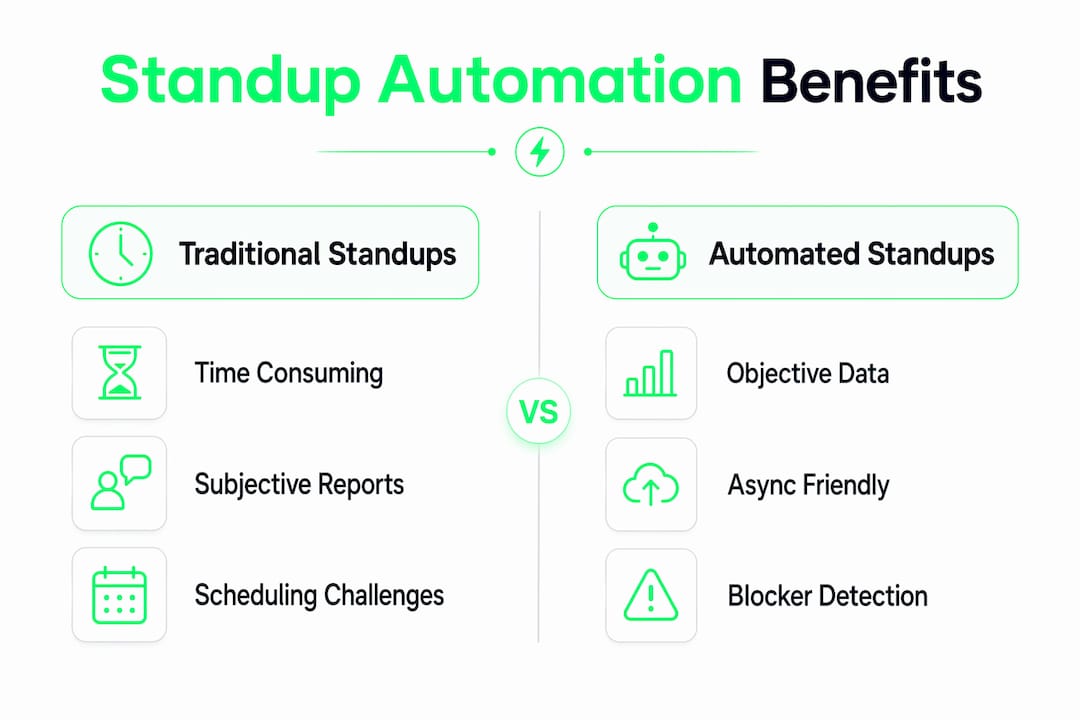
Automation surfaces blockers based on ticket status duration and sprint states, not on whether someone felt comfortable speaking up in a meeting. A ticket that has sat in "In Review" for three days gets flagged automatically. A PR with no activity for 48 hours appears in the report. This shift from subjective self-reporting to objective data-driven visibility is the core value proposition.
The productivity numbers back this up:
| Metric | Traditional standup | Automated standup |
|---|---|---|
| Daily prep time per developer | 10 to 15 minutes | Under 1 minute |
| Weekly meeting time reduction | Baseline | 20 to 30% shorter |
| Productive hours regained weekly | 0 | 4 to 8 hours per developer |
| Blocker detection method | Self-reported | Data-driven, automatic |
Teams using AI-driven automation report 20 to 30% shorter meetings and developers regaining 4 to 8 productive hours weekly. Across a team of six engineers, that is the equivalent of adding a part-time developer to your sprint capacity.
"The biggest value of automation is the shift from subjective status updates to objective, data-driven visibility, allowing earlier identification of blockers." — The standup meeting revolution
Timezone and async teams benefit even more. A developer in Berlin and a developer in Austin no longer need to find a meeting time that works for both. The automated report lands in Slack at 9 a.m. local time for each, generated from the same live data. Distributed teams gain the same visibility as co-located ones without the scheduling gymnastics.
What are the best practices for implementing standup automation?
Getting standup automation right requires more than installing a tool. The quality of your automated reports is a direct reflection of your team's development discipline. Here is a practical sequence for implementation:
-
Audit your data hygiene first. Automation quality depends entirely on good input data. If your team writes vague commit messages like "fix stuff" or leaves tickets in the wrong status, the AI will generate inaccurate summaries. Before deploying any agent, spend one sprint enforcing descriptive commits and real-time ticket updates.
-
Choose an agent, not a bot. Tools that only send reminder prompts produce the same subjective self-reports as a manual standup, just delivered digitally. Select a platform that reads live data from your actual project management stack.
-
Integrate with your existing workflow. Grounding AI agents in live organizational data is what separates useful automation from generic chatbot responses. Configure your agent to pull from the specific boards, repositories, and pipelines your team actually uses.
-
Enable persistent memory. Set up your agent to track unresolved blockers across days. A blocker that appeared in Monday's report and reappears unchanged on Wednesday is a signal that needs attention, not just documentation.
-
Schedule a weekly sync. Automation handles the daily data layer, but it does not replace human judgment on team morale, interpersonal friction, or strategic pivots. Keep one short weekly meeting for the conversations that data cannot capture.
Pro Tip: Treat standup automation as a byproduct of good engineering habits. Disciplined workflows like TDD and structured commits produce the clean data that makes AI summaries accurate. If your automation is producing noise, the problem is usually upstream in your development process, not in the tool itself.
The teams that fail with standup automation almost always skip step one. They deploy a sophisticated AI agent on top of messy, inconsistent data and then blame the tool when the reports are wrong. The automation is only as good as the habits feeding it.
Examples and tools for standup automation in 2026
Several tools represent the current range of standup automation capabilities, from lightweight CLI scripts to full AI agents with deep integrations.
Tools like SlackClaw OpenClaw, Standuply, Geekbot, and AI-powered CLI tools pull GitHub activity and generate Slack posts automatically, covering a wide range of integration depths. Here is how the major categories compare:
| Tool type | How it works | Best for |
|---|---|---|
| Reminder bots (Geekbot, Standuply) | Prompts team members to self-report via Slack | Teams new to async standups |
| Autonomous agents (OpenClaw, Jira agents) | Reads live data from GitHub, Jira, Linear | Teams with strong data hygiene |
| AI CLI tools (standup-cli) | Pulls GitHub commits, generates terminal or Slack output | Solo developers or small teams |
| Custom copilots (Claude, Azure DevOps agents) | Summarizes sprint data via API with custom prompts | Engineering teams with specific reporting needs |
A practical example of how this works: a team using Jira and GitHub connects an autonomous agent to both platforms. Each morning at 8:45 a.m., the agent reads all ticket transitions from the previous 24 hours, scans merged and open PRs, identifies any tickets that have not moved in more than two days, and posts a formatted summary to the team's Slack channel. Developers spend 30 seconds reviewing it instead of 15 minutes preparing for a meeting.
The AI coding tools available in 2026 increasingly include standup automation as a native feature rather than a separate add-on, which means teams evaluating their development stack should factor reporting capabilities into their tool selection criteria.
Key takeaways
Standup automation works best when autonomous AI agents read live project data directly, replacing subjective self-reporting with objective, ticket-driven visibility that saves developers 4 to 8 hours per week.
| Point | Details |
|---|---|
| Core definition | Standup automation uses AI agents to collect and summarize project data without manual input. |
| Time savings are real | Preparation drops from 10 to 15 minutes to under 1 minute per developer per day. |
| Objectivity is the key gain | Blockers are flagged from ticket data, not from self-reporting, which catches problems earlier. |
| Data hygiene is non-negotiable | Descriptive commits and updated tickets are required for accurate AI-generated reports. |
| Agents beat bots | Autonomous agents that read live data outperform reminder bots that collect typed responses. |
Why I think most teams are still doing this wrong
I have reviewed dozens of standup automation setups, and the pattern I see most often is teams deploying a sophisticated tool on top of a broken process. They install OpenClaw or a Claude-powered agent, connect it to Jira, and then wonder why the reports read like noise. The answer is always the same: the tickets are a mess.
The uncomfortable truth about standup automation is that it does not fix your process. It amplifies it. If your team updates tickets consistently and writes meaningful commit messages, the automation produces reports that are genuinely better than anything a human would write in a morning meeting. If your team treats Jira as a formality, the automation produces a polished summary of nothing useful.
There is also a social dimension that most automation guides ignore. Daily standups, for all their inefficiency, serve a secondary function: they are a forcing mechanism for team cohesion. Removing them entirely without replacing that social layer creates distributed teams that feel disconnected. The teams I have seen get this right keep one short weekly video call for the human stuff and let automation handle the data layer completely. That split is not a compromise. It is the right architecture.
My advice: before you evaluate any tool, spend two weeks enforcing good data hygiene on your team. Descriptive commits, real-time ticket updates, PR descriptions that explain the "why." After two weeks, run a standup automation tool against that data. The quality difference will tell you everything you need to know about whether your team is ready. You can explore real developer tool confessions on Stackreview to see how other teams have navigated exactly this transition.
— Alpha
Find the right standup automation tool for your team
Choosing the right standup automation tool is not obvious, and the wrong choice wastes more time than it saves.
Stackreview tests developer tools the way developers actually use them, covering real pricing, actual integration depth, and the specific tradeoffs that matter for engineering teams. Whether you are evaluating autonomous agents like OpenClaw, reminder-based tools like Geekbot, or custom AI copilots built on Claude, the honest AI dev tool reviews on Stackreview give you a clear picture before you commit. If you are not sure where to start, the AI tool matcher helps you find the right fit for your team's stack and workflow in under two minutes.
FAQ
What is the standup automation definition in simple terms?
Standup automation is the use of software agents that automatically collect data from tools like Jira and GitHub and generate daily team status reports without requiring manual input from developers.
How does standup automation work with Jira and GitHub?
The agent connects to Jira and GitHub via API, reads ticket transitions, commits, and pull request activity from the past 24 hours, and uses an AI model to summarize that data into a readable standup report posted to Slack or another channel.
What are the main benefits of standup automation for remote teams?
Remote and distributed teams gain timezone-independent visibility, with each developer receiving an accurate status report generated from live data rather than waiting for a synchronous meeting that spans multiple time zones.
What is the difference between a standup bot and a standup automation agent?
A standup bot sends prompts and collects typed responses from team members, which is still manual self-reporting delivered digitally. A standup automation agent reads live project data directly and generates the report without any input from the team.
What are the standup automation best practices for accuracy?
Accuracy depends on data quality. Teams should write descriptive commit messages, keep tickets updated in real time, and connect the agent to at least two data sources before going live. Poor data hygiene is the leading cause of inaccurate automated reports.