
Replacing manual processes with automation tools is defined as the systematic substitution of human-executed, repetitive tasks with software-driven workflows that operate faster, with fewer errors, and at scale. Platforms like Zapier, Pipefy, and Boomi AI Agents represent three distinct tiers of this shift, from simple trigger-action rules to full AI-driven orchestration. The business case is concrete: some organizations have achieved a 60% efficiency increase by deploying hundreds of AI agents, with measurable ROI appearing within days. This guide walks business owners and operational teams through identifying which processes to automate first, choosing the right tools, and avoiding the implementation traps that derail most projects.
What manual processes should you automate first?
The highest-value targets for process automation share three characteristics: high volume, high error rate, and significant time consumption. Approvals, data entry, task routing, invoice processing, and status update emails all qualify. These are not glamorous problems, but they are expensive ones.

The core issue is what researchers call "work about work." Knowledge workers spend roughly 60% of their time on coordination tasks like chasing approvals, copying data between systems, and sending status updates rather than doing the actual work they were hired to do. For a 50-person team, that translates to the equivalent of 30 full-time employees spending their days on administrative overhead.
To prioritize effectively, score each candidate process across three dimensions:
- Volume: Does this task happen more than 20 times per week? High-frequency tasks deliver faster payback.
- Error rate: Does a human mistake here cause downstream rework, customer complaints, or compliance issues? Data entry into CRMs and ERPs is a classic example.
- Handoff count: Does the task cross three or more departments or systems? Multi-handoff processes are where delays compound fastest.
- Rule clarity: Can the decision logic be written down in plain language? If yes, it is automatable today. If it requires nuanced judgment, it may need an AI agent rather than a simple rule.
Pro Tip: Before buying any tool, spend one week logging every task your team repeats more than five times. That log becomes your automation backlog and your ROI justification.
Start with one process that scores high on all four dimensions. A single successful automation builds internal credibility faster than a sprawling pilot that touches ten workflows at once.
How do simple workflow tools differ from AI-driven automation platforms?
Not all automation tools solve the same problem. Choosing the wrong tier is the most common reason automation projects stall after the first deployment.
Simple tools handle linear, trigger-to-action sequences well. Zapier and Make (formerly Integromat) are the clearest examples. You define a trigger ("a new row is added to this Google Sheet") and an action ("create a task in Asana"). These tools are fast to set up, require no coding, and cover thousands of app integrations. They break down when a workflow requires context, exceptions, or judgment.
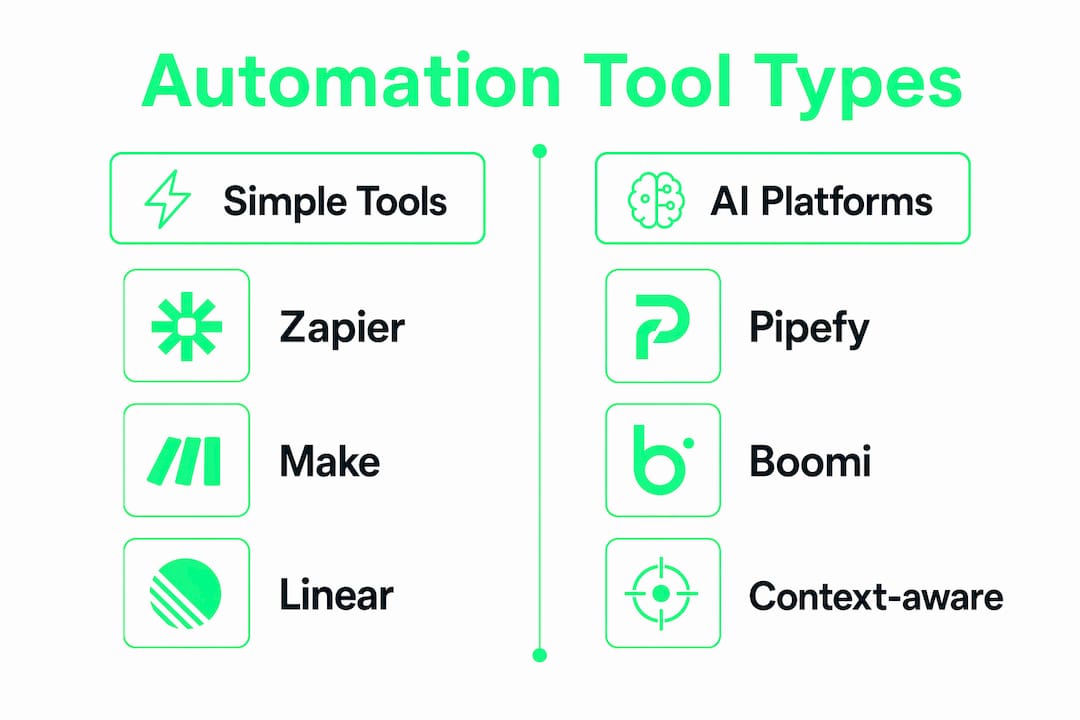
Agentic platforms like Pipefy, Boomi, and Sentie operate differently. They do not just execute a fixed sequence. They evaluate context, handle exceptions, and route work based on factors like workload, expertise, and process state. Sentie AI agents, for instance, route tasks intelligently based on expertise, workload, and real-time context, which is something no trigger-action script can replicate.
| Dimension | Simple tools (Zapier, Make) | Agentic platforms (Pipefy, Boomi, Sentie) |
|---|---|---|
| Setup complexity | Low, no-code | Medium to high, visual builders |
| Best for | Linear, rule-based tasks | Multi-step, judgment-required workflows |
| Exception handling | Manual fallback required | Built-in exception routing |
| Integration depth | App-to-app connectors | API orchestration, legacy systems |
| Governance and audit | Minimal | Full traceability and lifecycle management |
| Cost tier | Low to mid | Mid to enterprise |
The decision rule is straightforward. If your process has one trigger, one action, and no exceptions, start with Zapier or Make. If your process crosses departments, involves approvals with conditions, or requires a human-in-the-loop for edge cases, move to an agentic platform from day one. Trying to build judgment into a trigger-action tool creates brittle middleware that breaks every time a connected app updates its API.
Pro Tip: Map your workflow on a whiteboard before opening any tool. If you draw more than two decision diamonds, you need an agentic platform, not a simple connector.
Specialized tools also occupy a middle tier. Intelligent document automation platforms like Docspire achieve 99.5% accuracy in capturing, classifying, and routing large document volumes, which makes them the right choice for invoice processing, contract review, or compliance documentation rather than a general-purpose workflow tool.
How to select and implement the right automation tools for your business
Selecting the right tool starts before you open a vendor website. The prerequisite is a clear picture of your existing software stack and where data currently moves between systems.
Follow this sequence to avoid the most common selection mistakes:
- Audit your current stack. List every tool your team uses daily. Identify where data is manually copied from one system to another. Each copy-paste is an automation candidate.
- Define success metrics before you buy. Decide whether you are measuring time saved per week, error rate reduction, or cost per transaction. Without a baseline, you cannot prove ROI.
- Prioritize no-code or low-code builders. Automation platforms with no-code builders enable business and IT alignment by letting operations teams describe processes in plain language and generate visual blueprints without writing code. This matters because IT bottlenecks kill automation momentum faster than any technical limitation.
- Evaluate integration depth. Check whether the tool connects natively to your CRM, ERP, and communication platforms. Native connectors are more reliable than custom API scripts for most teams.
- Plan for governance from day one. AI agent management is critical to prevent agent sprawl and security risks. Every agent you deploy needs an owner, a documented purpose, and a deactivation plan.
| Implementation phase | Key action | Success indicator |
|---|---|---|
| Discovery | Map all manual handoffs | Automation backlog created |
| Tool selection | Match complexity to tool tier | Vendor shortlist of 2-3 options |
| Pilot deployment | Automate one high-volume process | Time saved measured in week 1 |
| Governance setup | Assign agent owners, log all agents | Zero undocumented agents running |
| Scale | Expand to adjacent processes | ROI documented per process |
Legacy system modernization does not always require a rebuild. Rebuilding legacy processes is often less efficient than orchestrating them with AI agents that extend existing system investments. Pega Blueprint, for example, enables enterprises to transition to cloud-ready automation in under 40 hours using AI-powered blueprints. That speed is only possible because the platform works with existing systems rather than replacing them.
For teams evaluating automation tools for your team, the most important filter is whether the tool supports your team's actual technical skill level, not the skill level the vendor assumes you have.
What are common challenges when implementing automation?
Most automation projects do not fail because of bad tools. They fail because of predictable, avoidable problems that surface after the first deployment.
- Brittle middleware: Most automation failures stem from fragile manual connections between too many tools. When one app updates its API or changes a field name, the entire chain breaks. Agent-based orchestration solves this by managing integration logic centrally rather than distributing it across dozens of point-to-point connections.
- Edge case blindness: Teams automate the happy path and forget that 20% of transactions are exceptions. Before going live, deliberately test every exception scenario you can imagine. Document what the system does when it encounters an unrecognized input.
- Shadow AI and undocumented agents: Individual team members often deploy their own automations using personal accounts on tools like Zapier or Make. These shadow automations create data governance gaps and security exposure. Centralized lifecycle management improves observability and prevents agents from running without accountability.
- Traceability gaps: Traceability and data locality are non-negotiable for compliance-sensitive workflows. Platforms that act as both MCP clients and servers maintain decision audit trails, which means you can reconstruct exactly what an agent did and why. Without this, you cannot pass an audit or diagnose a failure.
- Scope creep in orchestration: Teams that successfully automate one process often immediately try to automate everything at once. This creates a tangled orchestration layer that is harder to debug than the manual process it replaced. Automate iteratively, measure each deployment, and only expand when the previous layer is stable.
The practical fix for most of these problems is treating automation as a product, not a project. Assign an owner, set a review cadence, and document every agent the way you would document a software dependency.
Key takeaways
Replacing manual processes with automation tools delivers the highest ROI when you match tool complexity to process complexity, govern every agent from day one, and measure outcomes before scaling.
| Point | Details |
|---|---|
| Prioritize by volume and error rate | Target high-frequency, error-prone tasks first to maximize early ROI. |
| Match tool tier to process complexity | Use Zapier or Make for linear tasks; use Pipefy, Boomi, or Sentie for judgment-required workflows. |
| No-code builders accelerate deployment | Platforms with visual builders align business and IT teams, cutting deployment time significantly. |
| Govern agents from the start | Assign owners and document every agent to prevent sprawl and security gaps. |
| Automate iteratively, not all at once | Stable, measured deployments outperform sprawling pilots every time. |
Why most automation advice misses the hard part
Most articles on workflow automation tell you to "start small and scale." That advice is not wrong, but it skips the part that actually determines success: governance architecture.
I have watched teams deploy 30 Zapier automations in a month, celebrate the time savings, and then spend the next quarter debugging broken workflows because no one owned them. The tools were fine. The process around the tools was nonexistent.
The shift that changes outcomes is treating automation infrastructure the same way you treat your software stack. You would not deploy a new database without documentation, an owner, and a backup plan. Every AI agent and every automated workflow deserves the same discipline. Platforms like Boomi and Salesforce Agentforce are building toward a model where automation serves as a single source of truth, maintaining visibility for both humans and AI. That is the right direction, and it is worth orienting your tool selection around that principle even if you are starting with a single Zapier workflow today.
The teams that scale automation successfully are not the ones with the most tools. They are the ones with the clearest ownership model and the most honest measurement of what is actually working.
— Alpha
Find the right automation tools without the guesswork
Stackreview tests automation tools the way your team will actually use them, not the way vendors demonstrate them in polished demos. The platform covers everything from no-code workflow connectors to enterprise AI agent platforms, with honest assessments of pricing, integration depth, and real-world limitations. If you are building out an automation stack and need to compare options side by side, the tools for your team section organizes reviews by team size, use case, and technical skill level. For a broader look at where AI-powered automation intersects with development workflows, the best AI coding tools roundup covers the tools that technical teams are actually deploying in 2026.
FAQ
What does it mean to replace manual processes with automation tools?
Replacing manual processes with automation tools means substituting repetitive, human-executed tasks with software workflows that run automatically based on defined rules or AI-driven logic. The goal is to reduce errors, save time, and free up team capacity for higher-value work.
Which processes are easiest to automate first?
High-volume, rule-based tasks with clear decision logic are the easiest starting points. Data entry, approval routing, invoice processing, and status notification emails are common first targets because they follow predictable patterns and deliver measurable time savings quickly.
When should you use an AI agent platform instead of Zapier?
Use an AI agent platform when your workflow requires context-awareness, exception handling, or decisions based on multiple variables. Zapier and Make work well for linear trigger-action sequences. Platforms like Pipefy, Boomi, and Sentie are better suited for multi-step workflows that cross departments or require judgment.
How do you measure the ROI of automation?
Establish a baseline before deployment by measuring time spent, error rate, and cost per transaction for the manual process. After deployment, compare those same metrics weekly. Some organizations see measurable ROI within days of deploying AI agents at scale.
What is agent sprawl and why does it matter?
Agent sprawl occurs when teams deploy automations and AI agents without centralized tracking or ownership, creating security gaps and unaccountable processes. Managing agent lifecycle through platforms like Boomi prevents undocumented agents from running unchecked and ensures every automation can be audited or deactivated when needed.